

Tinybeans or FamilyAlbum (or Momora): which fits your family
Say it's a Tuesday afternoon. You have a 40-second playground video that Grandma would love to see tonight. You also want to keep the line your kid said on the slide ("I'm the boss of gravity") and be able to find both in 2031.
Of the two apps people usually compare, FamilyAlbum is the better fit for the first job. It's built as a private, central place to share and save family photos and videos, and the free version gives you unlimited uploads and storage, with videos capped at under two minutes. It's also designed with less tech-comfortable relatives in mind.
Tinybeans fits the second job better. It's set up as a private family feed with a journal-style memory record, and relatives can follow along through email updates and comments.
Momora is a third option. We make Momora. It's a private memory journal that holds photos, videos, text, and voice. It's built for quick capture: you can dictate a quote for up to two minutes, and the app transcribes it and suggests family tags so you can search for it later. It's newer than the other two and doesn't publish a free tier the way FamilyAlbum does.

In short:
- FamilyAlbum is best for easy, free sharing with grandparents.
- Tinybeans is best for an ongoing family feed that doubles as a journal.
- Momora is best for capturing quotes and stories fast and finding them later.
These are our editorial best-fit calls, based on each company's public pages. They aren't the results of side-by-side testing.
The three apps side by side on the same seven questions
Same rows for all three apps. Facts come from each company's own pages and app listings, checked in March 2026.
| Tinybeans | FamilyAlbum | Momora (ours) | |
|---|---|---|---|
| Private sharing | Private family feed, invite-only | Private shared album, invite-only | Private timeline with role-based access |
| Structured memory keeping | Dated memories, milestones, calendar browsing | Month-based organization, comments | Timeline and calendar views, search, family tags |
| Capture effort | Photo and video posts with captions | Photo and video uploads | Photos, videos, text, dictated notes, sounds, artwork |
| Ease for relatives | Email updates and browser access | Browser version, no app needed | Email one-time-code sign-in, app required |
| Photo and video handling | Free: 20 uploads a month, 5GB. Tinybeans+: unlimited, 200GB, videos to 5 min | Free: unlimited storage, videos under 2 min. Premium: up to 10 min | 1 to 10 items per memory, images to 20MB, videos to 3 min, compressed before upload |
| Privacy and data control | Private by default | Encrypted transfers, deleted media removed within 30 days, some data shared with ad and analytics providers | Time-limited media links, EXIF stripped, archive export, 15-day deletion grace period, OpenAI processes AI features |
| Pricing and value | See Tinybeans' site | Free tier. Premium $5.99/mo or $59/yr, Pro $10.99/mo or $109/yr | See Momora's site |
Sources: Tinybeans on Google Play, FamilyAlbum plans, FamilyAlbum privacy policy, Momora FAQ.
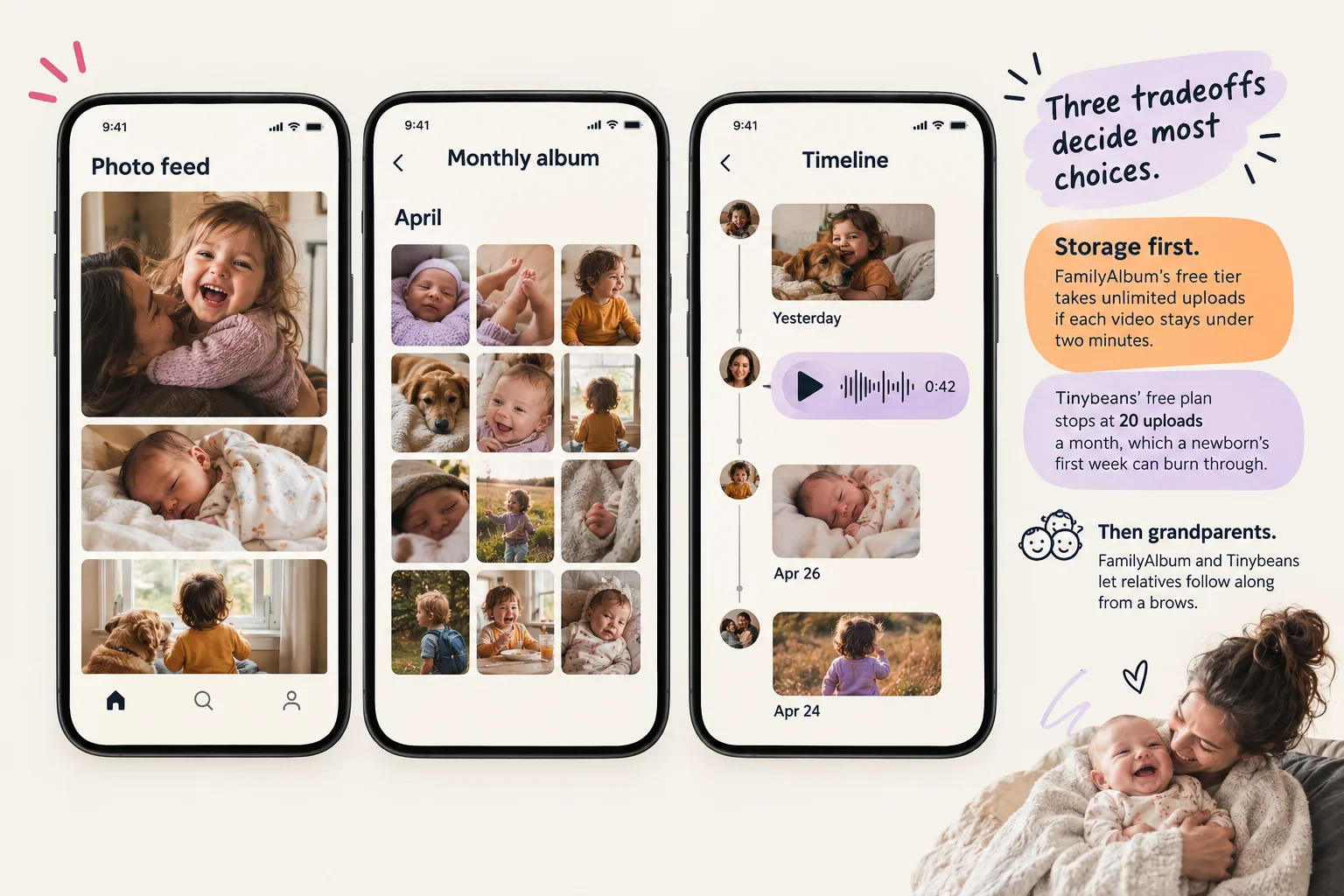
Three tradeoffs decide most choices.
Storage first. FamilyAlbum's free tier takes unlimited uploads if each video stays under two minutes. Tinybeans' free plan stops at 20 uploads a month, which a newborn's first week can burn through.
Then grandparents. FamilyAlbum and Tinybeans let relatives follow along from a browser or email. Momora asks every viewer to sign in through the app. For a grandparent who doesn't install apps, that's a real hurdle.
Then privacy. Momora publishes the most specific controls, including stripped location data and full archive export. It also sends some content to OpenAI when you use AI features, and it compresses videos. FamilyAlbum is clear about deletion, and its policy describes sharing some data with advertising partners.
How we judge each app in the sections ahead
"They all say private. They all say easy. So how do I actually pick?"
The next five sections take one criterion at a time, in the same order for every app. First sharing and setup, then memory keeping, photos and videos, privacy and data control, and finally price. Tinybeans and FamilyAlbum go head to head first, since that's the choice most of you came here to make. Momora follows and answers the same questions. It gets no extra credit for being ours.
You'll see three kinds of statements, and we keep them apart.
Facts come from each company's own pricing, help, privacy, and app-store pages, checked in March 2026. We link them where they appear.
Company claims, like "private by default" or "about ten seconds to add a memory," are written as what the company says. They are not proven results.
Our judgments say "we think" or sit in the final verdicts, so you can weigh them and disagree.
The criteria often pull against each other. The app that's easiest for a grandparent with only a browser may hold fewer kinds of memories. The app built for quotes, voice notes, and artwork may need every relative to install it. A generous free tier and detailed privacy controls don't always come in the same app. Most families give up one of these to get another, and the sections ahead show where each app makes that trade.
Inviting family and controlling who sees what
"I posted one video from the playground. My partner wants to add what happened. Two grandparents want to watch it and say something. Do all four of us need the app?"
The answer depends on the app.
With Tinybeans, you're the journal owner. You upload the video, and relatives you've invited view it in the app or on the website. Followers can like or comment by email, web, or app, and you decide whether relatives can add their own photos. That gives a grandparent who lives in their inbox a fairly gentle path. Tinybeans doesn't publish detailed per-person roles, so the controls amount to deciding who's in and whether they can post.
FamilyAlbum gives you more structure. Each person is either an Album Admin or an Album Member. Admins invite and remove people. When you upload, you pick "Share with Family" or "Admins Only," and only admins can change that later. That's useful if you want to keep the tantrum clip between parents. Grandparents can use the browser version to view, download, and comment without installing anything, but browser accounts can't upload. Uploading from a computer requires Premium.
You might pick FamilyAlbum for its admin-only visibility and clear roles. You might pick Tinybeans if grandparents would rather reply by email than open a browser.

Momora is the third option, and we make it. Each family journal has one owner, plus managers and viewers. In the playground example, your partner would be a manager who can add context, edit, and manage members. The grandparents would be viewers who can browse, react, and comment. Invites use a private, single-use code valid for seven days. Removed members lose access immediately, and anything they added stays unless an owner or manager deletes it.
Momora has real limits here. It has no per-memory audience setting, so it can't do anything like FamilyAlbum's "Admins Only" option, and you can't share a memory with grandparents alone. Ownership can't be transferred to another member. Momora runs on iOS and Android, so a grandparent who only wants email or a browser will have an easier time with Tinybeans or FamilyAlbum.
Keeping quotes, stories, and artwork, plus photos
"She told me the slide was 'too fast for my bones.' I want to remember that when she's twelve."
Here's a simple way to compare the three apps. Can you save those words quickly, add where she said them, attach them to the right kid, and find them again in five years?
Tinybeans is built like a journal. You can combine photos, videos, captions, and notes and track milestones by date. The bones line would be a caption or a note on a playground photo, ordered by date. That works well if you already post photos. Tinybeans doesn't offer a separate voice-note or artwork tool, so the quote lives as typed text. Photo books are sold separately.
FamilyAlbum leans toward sharing first and organizing second. The base app is a private chronological album with comments on each photo or video, so the quote would most likely end up as a comment. Paid plans add more structure. Premium adds child-focused Personal Pages, monthly journals, and monthly and yearly 1s Movie recaps. The free version makes them quarterly. Comment search and tags require Premium Pro. FamilyAlbum is also the strongest of the three on paper. Each member gets 11 free prints a month with $3.99 shipping, and photobooks are sold separately.

Momora treats the quote itself as the memory. A memory can be words, photos or videos, kept sounds, or artwork. You can type the quote or record her saying it. Momora keeps the actual audio along with a hidden transcript, so searching "bones" later should bring it up. You can tag people and filter by person or feeling. You can also backdate an entry, which helps if you remember the quote at bedtime. Artwork scanning holds up to 10 pieces per memory, and films arrive monthly, on birthdays, and at year's end. Printed Memory Books and holiday cards are available too.
Momora has limits. A kept sound and the playground photo need separate memories, because each memory is one type. A photo memory can still have a written caption. Momora has no milestone tracker, so parents who want a "first steps" checklist will be better served by Tinybeans or FamilyAlbum Premium. Our promise that adding a memory takes about ten seconds is our own claim. Nobody has timed it independently.
If you're still deciding which capture habit fits your family, our apps like Qeepsake guide compares text prompts, shared albums, voice capture, and printed books.
Upload limits, storage, and downloads for photos and videos
"I just want the playground video and eight photos saved somewhere that won't shrink them."
Each app handles the upload differently, so the length of that video and your plan both make a difference.
On Tinybeans' free plan, you get 20 photo or video uploads a month, so one playground afternoon could use almost half of it. Tinybeans+ removes the cap, allows videos up to 5 minutes, and includes 2 TB of storage. You can download items one at a time, and bulk export is a Tinybeans+ feature. When you're ready, photobooks pull from journal images within a date range you pick.
FamilyAlbum gives everyone unlimited storage and uploads. Free videos max out at 2 minutes, and Premium raises that to 10. It accepts HEIC, JPG, PNG, MP4, and MOV, but not HEVC, which some phones use for video. On a computer, Premium members can upload images up to 200 MB and videos up to 5 GB. Unlimited storage tells you how much you can keep. FamilyAlbum doesn't say whether downloads come back as your original files.
Momora puts 1 to 10 photos or videos in one memory. Each image can be up to 20 MB, and each video can be up to three minutes, compressed before upload to fit the 100 MB uploaded-file limit. Momora re-encodes images and strips EXIF data, including GPS location. That protects your privacy, but the copy saved in Momora isn't your camera's original file. Family owners can export every memory at any time, and Memory Books ship to the US and Canada.
None of the three apps promises lossless storage or print-resolution downloads. If the originals are what you care about, keep a separate backup and use the app for sharing.
Privacy and control: who sees your photos and how you get them back
"Grandma can see it. Fine. But who else can?"
All three apps are invite-only. On Tinybeans, only followers you invite see shared memories. Owners can change someone's access or hide individual memories, and invite links can be one-time links that expire after 24 hours. FamilyAlbum keeps albums private to owners and invited members and lets you limit downloads to admins. Momora keeps journals private to family members, with role-based access and media links that expire.
Owning your photos and licensing them are separate things. Under Momora's terms, you keep ownership. You also give Momora a worldwide, non-exclusive, royalty-free license to host, process, and create derivative works so the app can run. That license ends when you delete your content, with exceptions for backups, legal retention, and content shared with family. Tinybeans' help pages don't spell out a content license.
Momora sends feature-specific data to OpenAI when you use transcription, image analysis, illustrations, or emotional-tone tagging. OpenAI says API data isn't used for training by default. For suggestions, Momora uploads small previews and clears any you ignore after 30 days. It strips GPS data from photos, though not from video yet.
FamilyAlbum lists the most security measures: encryption in transit, firewalls, two-factor login for its own administrators, SSH-key controls, and outside security inspections. Tinybeans' Play Store listing says data is encrypted in transit, which protects files while they travel. None of the three apps claims end-to-end encryption. Momora doesn't publish encryption-at-rest details, independent audits, or two-factor login for users.

On Tinybeans, eligible paid or Full Access users can request date-range bulk exports, with download links that expire after five days. You can delete your account in the app or by email, but Tinybeans doesn't publish how long it keeps backups. FamilyAlbum says it generally removes deleted data within 30 days unless the law requires it to keep data longer. When a Momora owner deletes their account, journals stay hidden for a 15-day grace period and are then permanently deleted. Anything you've already exported is no longer covered by Momora's access controls.
What you pay for each app, and what it gets your family
"Is the free version enough, or will I hit a wall in month two?"
That depends on how much you upload and who pays.
Tinybeans' free plan gives you private sharing, 20 photo or video uploads a month, and 5 GB of storage, with ads. Shoot a lot of video and you can hit that cap in a week. Tinybeans+ costs $7.99 a month or $74.99 a year (as of March 2026), with a two-week free trial. It adds unlimited uploads, five-minute videos, no ads, a second user account, memory export, and free shipping on photo books sent to US addresses. Subscriptions renew automatically unless you turn off auto-renew at least 24 hours before the period ends. If it lapses, the ads and upload cap return, but earlier memories stay saved.
FamilyAlbum has a free version. Premium adds longer videos, computer uploads, child-sorted views, and monthly journal entries. When one person buys Premium, everyone in that album gets it. It's billed through the App Store or Google Play and stays active through the paid period. Check FamilyAlbum's site for current Premium pricing.
Prints are where FamilyAlbum stands out. Each album member gets 11 free prints a month, with extras at $0.33 each. Photobooks run from $7.99 for a classic softcover to $59.99 for a large hardcover. Premium members get free shipping. Premium One doesn't include it.
We make Momora, so here are its terms in the same detail. Momora Plus is $99.99 a year or $12.99 a month (US list price). Only the family owner pays. Everyone else gets access through the owner. Eligible new owners may get a seven-day trial on the annual plan. The monthly plan has no trial. Printed books and cards cost extra. If paid access ends, the family can still read the journal and the owner can still export everything. Adding or editing memories requires renewing.

For a big family, one album-wide payment like FamilyAlbum's or Momora's means relatives don't each pay. If you print often, FamilyAlbum's free monthly prints add up. If losing access worries you, look at what you can still read and export after you stop paying.
Which app fits your family's priority
"Just tell me which one to download."
There's no single winner. It depends on what you want the app to do.
Choose FamilyAlbum if you want high-volume sharing on a generous free tier, or if relatives use a mix of iPhone, Android, and a web browser. It's the easiest pick for grandparents who won't install anything. The tradeoff is that the structured, child-sorted views sit behind Premium.
Choose Tinybeans if you want a conventional private baby journal with milestones and photo books, and you'd like email updates for relatives. The tradeoff is that the free plan's 20 uploads a month runs out fast for families who film a lot. That cap is a common reason to pick FamilyAlbum over Tinybeans.
Choose Momora if your priority is capturing more than photos: a toddler's quote, a voice note, a drawing, logged in seconds and suggested for your approval rather than posted automatically. The tradeoff is that it requires a paid owner subscription, with no free plan like FamilyAlbum. Family owners can export the journal at any time, but you should still keep your original files. Either competitor makes more sense if you mainly share photos or want a free plan.
If quick, structured memory capture is what you're after, look at Momora's current features and decide whether it fits. If not, the other two are solid choices.
For product-specific detail, read our Tinybeans review and FamilyAlbum review. If the camera roll itself needs attention, our photo organization guide compares tools, storage, and backup options.